Best Password Security Tools for Small Businesses in 2026
Password security tools for small businesses help protect employee accounts, business applications, customer data, and internal systems from credential theft and unauthorized access. In 2026, a practical small-business security stack typically combines a password manager with multi-factor authentication (MFA), while growing organizations may also benefit from single sign-on (SSO), identity management, and credential monitoring.
The key is not buying every security product available. Small businesses should build a layered authentication strategy that makes strong security easier for employees while giving administrators better control over who can access business systems.

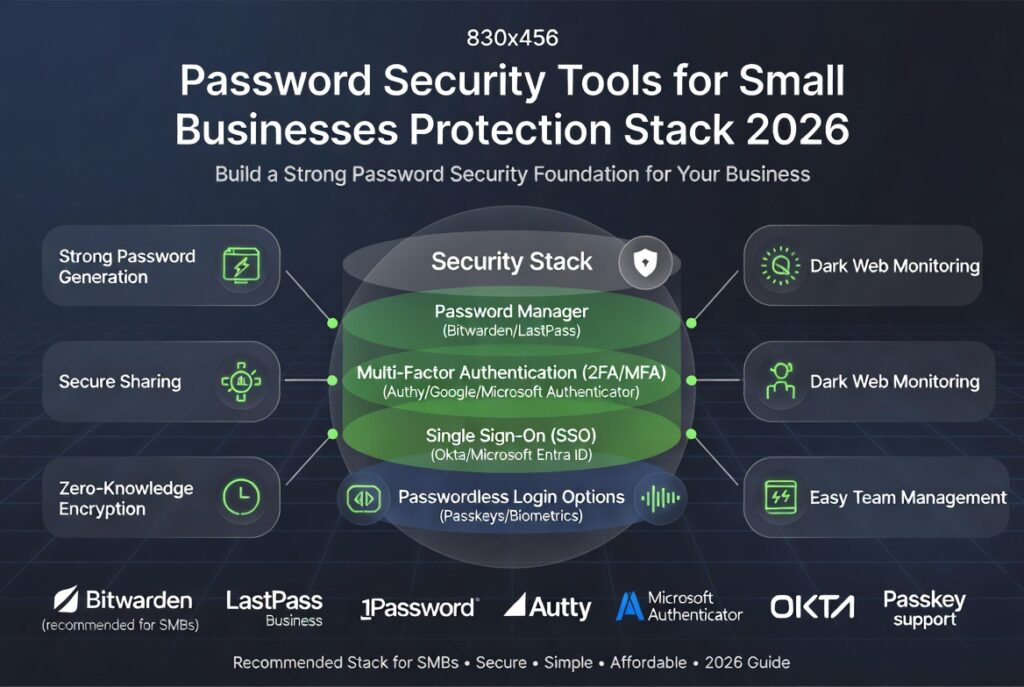
Password security tools for small businesses protection stack
Quick Answer: What Are the Best Password Security Tools for Small Businesses?
The best password security tools for small businesses combine password managers, multi-factor authentication, access management, and credential monitoring. A password manager helps employees create and store unique passwords, MFA adds another layer of protection during login, SSO centralizes application access, and credential monitoring can identify exposed accounts. For many small businesses, starting with a business password manager and phishing-resistant MFA provides the strongest security improvement for the effort and cost involved.
If you are building a broader security stack, start with our cybersecurity tools for small businesses guide. You can also compare dedicated password management platforms in our password manager tools comparison.
Why Password Security Matters for Small Businesses
Passwords remain an important part of business identity and access management. Weak, reused, stolen, or improperly shared credentials can expose email accounts, cloud applications, financial systems, customer databases, and administrative interfaces.
Small businesses are particularly vulnerable when security processes depend heavily on individual employees rather than centralized identity and access controls.
Common Password Security Risks
- Password reuse across multiple business applications
- Phishing and credential theft
- Weak or easily guessed passwords
- Shared credentials without individual accountability
- Accounts without multi-factor authentication
- Former employees retaining access
- Credentials exposed through previous data breaches
Organizations should therefore treat password security as part of a broader identity and access management strategy rather than as a standalone password policy.
Guidance from CISA and NIST emphasizes stronger authentication practices, phishing resistance, and appropriate access controls as important components of cybersecurity.
Best Password Security Tools for Small Businesses
Most small businesses do not need a large collection of security products. The most useful approach is to combine a few complementary technologies.
1. Business Password Managers
A business password manager gives employees a secure way to generate, store, autofill, and share credentials without relying on spreadsheets, browser notes, or reused passwords.
Popular business password managers include:
A good business password manager should provide more than encrypted password storage. Administrators should look for organization management, secure credential sharing, employee onboarding and offboarding, password health reporting, access controls, and support for MFA.
Our Analysis: Which Password Manager Should a Small Business Choose?
Bitwarden Business can be attractive for organizations prioritizing value and an open-source-oriented ecosystem.
1Password Business is particularly compelling for teams that prioritize usability, administrative controls, and a polished business experience.
Keeper Business is worth considering for organizations looking for a broader enterprise-oriented security feature set.
The right choice depends on team size, application integrations, administrative requirements, and budget rather than brand recognition alone.
What Can a Business Password Manager Do?
- Generate strong unique passwords
- Store credentials securely
- Reduce password reuse
- Share credentials through controlled vaults
- Manage employee access
- Identify weak or reused credentials
- Support secure employee onboarding and offboarding
- Integrate with MFA and identity systems
2. Multi-Factor Authentication (MFA)
Password managers solve the password-storage problem, but they do not eliminate the risk of stolen credentials. Multi-factor authentication adds another verification step before access is granted.
Common MFA and authentication products include:
For higher-risk accounts, businesses should prioritize phishing-resistant authentication, including passkeys and appropriately configured hardware-backed authentication methods where supported.
3. Single Sign-On and Identity Management
Single sign-on (SSO) allows employees to authenticate through a centralized identity provider instead of maintaining separate credentials for every application.
SSO can improve:
- Application access control
- User provisioning
- Employee offboarding
- Authentication visibility
- Centralized policy enforcement
- Administrative efficiency
Popular identity and SSO platforms include:
SSO becomes particularly valuable as a company grows and employees need access to an increasing number of SaaS applications.
4. Credential Exposure and Breach Monitoring
Credential monitoring tools can help organizations identify whether employee email addresses or other credentials have appeared in known data breaches or threat intelligence sources.
One useful public resource is Have I Been Pwned, which allows users to check whether an email address has appeared in known breaches.
Businesses with more advanced security requirements can also consider commercial identity-threat detection and dark-web monitoring services.
Password Security Tools Comparison for Small Businesses
| Tool Type | Primary Purpose | Best For | Priority |
|---|---|---|---|
| Password Manager | Generate and securely manage credentials | Almost every business | High |
| MFA | Protect accounts after password entry | Email, cloud apps, and admin accounts | Critical |
| SSO / Identity Provider | Centralize authentication and access | Growing organizations | High as complexity increases |
| Credential Monitoring | Identify exposed credentials | Security-conscious organizations | Medium |
| Passkeys | Reduce dependence on passwords | Supported applications and high-risk accounts | Increasing |
How to Choose Password Security Tools
The best password security stack depends on business size, application environment, employee behavior, regulatory requirements, and existing identity infrastructure.
Important Evaluation Criteria
- Ease of employee adoption
- Administrative controls
- MFA and passkey support
- SSO compatibility
- Application integrations
- Security auditing capabilities
- Employee onboarding and offboarding
- Scalability
- Compliance requirements
- Total cost of ownership
For Very Small Teams
A business password manager combined with MFA may provide the strongest starting point without introducing unnecessary infrastructure.
For Growing Companies
As the number of employees and SaaS applications increases, centralized identity management and SSO can make access administration considerably easier.
For Regulated Organizations
Organizations handling sensitive financial, healthcare, customer, or regulated data may require stronger identity governance, auditing, access reviews, and authentication controls.
Password Security Best Practices Beyond Tools
Technology alone does not create a secure authentication environment. Businesses also need policies and processes that reinforce the tools they deploy.
- Require unique credentials for business accounts
- Enable MFA wherever possible
- Prefer phishing-resistant authentication for high-risk accounts
- Apply least-privilege access
- Review permissions periodically
- Immediately remove access during employee offboarding
- Train employees to recognize phishing attempts
- Avoid sharing credentials through email or messaging apps
- Maintain an inventory of important business accounts
A password manager cannot compensate for an employee who still has unnecessary administrative privileges, just as MFA cannot compensate for an organization that never removes former employees from critical systems.
Free Small Business Security Checklist
Use our small-business security checklist to review password security, MFA, phishing protection, access control, and other foundational security practices.
Prefer direct access?
Password Security Tools Pricing
Pricing varies considerably by provider, plan, features, and number of users. Instead of relying on generic industry-wide price ranges, businesses should compare current vendor pricing based on their actual team size and required features.
When comparing costs, consider more than the monthly subscription. Administrative time, employee onboarding, integrations, security features, and the cost of managing multiple disconnected systems can materially affect the total cost of ownership.
Common Password Security Mistakes Small Businesses Make
Using Shared Logins
Shared credentials reduce accountability and make it harder to determine who performed an action.
Skipping MFA
Relying exclusively on passwords leaves accounts more exposed when credentials are stolen through phishing or other attacks.
Choosing Convenience Over Security
Employees naturally prefer simple workflows. The better solution is to deploy tools that make secure behavior convenient rather than expecting employees to remember increasingly complicated passwords.
Failing to Remove Former Employees
Offboarding should include disabling accounts, revoking sessions, removing application access, rotating shared credentials where necessary, and reviewing privileged access.
Ignoring Legacy Accounts
Old SaaS subscriptions, forgotten administrator accounts, and unused employee accounts can become unnecessary attack surfaces.
Are Password Security Tools Worth It?
For most small businesses, yes.
A password manager, MFA, and appropriate access controls can significantly strengthen an organization’s authentication posture while reducing the operational burden placed on employees and administrators.
The business case is strongest when security tools also improve productivity. Centralized access, password autofill, automated provisioning, and easier employee offboarding can deliver operational benefits in addition to security improvements.
The Future of Password Security
The long-term direction of authentication is moving beyond traditional passwords.
Passkeys, biometrics, hardware-backed credentials, and phishing-resistant authentication are increasingly important because they can reduce reliance on passwords that can be guessed, reused, or stolen through phishing.
However, passwords will remain part of many business environments for years. Small businesses therefore need to improve password security today while preparing for a gradual transition toward stronger passwordless authentication.
Follow emerging developments in Tech News.
Our Analysis: What Should a Small Business Buy First?
Small businesses should resist the temptation to build an unnecessarily complicated identity stack.
Our recommended progression is straightforward:
- Start with a business password manager. Eliminate password reuse and insecure credential sharing.
- Add MFA. Protect critical accounts even when passwords are compromised.
- Strengthen administrator accounts. Prioritize phishing-resistant authentication where possible.
- Add SSO and centralized identity management. Introduce this as the number of applications and employees grows.
- Introduce credential monitoring. Improve visibility into exposed accounts and credentials.
- Move toward passkeys. Adopt passwordless authentication wherever applications and workflows support it.
The objective is not to buy the most expensive security platform. It is to create a security system that employees can actually use and administrators can consistently manage.
Conclusion
Password security tools for small businesses are foundational cybersecurity controls in 2026. The right combination can reduce credential-related risk, simplify employee access, and give administrators greater visibility over business accounts.
For many organizations, the best starting point is a business password manager combined with MFA. As the company grows, SSO, centralized identity management, credential monitoring, and passkeys can provide additional layers of protection.
The most effective strategy is therefore layered rather than product-focused: secure credentials, strengthen authentication, control access, monitor exposure, and continuously remove unnecessary privileges.
Frequently Asked Questions
What are the best password security tools for small businesses?
Popular options include business password managers such as 1Password, Bitwarden, Dashlane, and Keeper, combined with MFA and, for growing organizations, SSO or centralized identity management.
Do small businesses need both a password manager and MFA?
Yes. A password manager helps employees create and manage unique credentials, while MFA provides an additional authentication factor when they sign in. Using both creates a stronger authentication strategy.
Are password security tools worth the cost?
For most small businesses, yes. Password managers and authentication tools can improve security while also reducing the operational burden associated with managing credentials and employee access.
What is the difference between MFA and SSO?
MFA adds additional verification to a login, while SSO allows users to authenticate through a centralized identity provider to access multiple applications.
Should small businesses use passkeys?
Yes, where supported. Passkeys can reduce reliance on passwords and provide strong protection against phishing. Businesses can adopt them gradually alongside existing password and MFA systems.
What is the most important password security tool for a small business?
For many small businesses, a business password manager is an excellent starting point because it helps eliminate password reuse and insecure credential sharing. MFA should then be enabled for important accounts.

Leave a reply